
MCP Connector
Connect Fond to Claude or any MCP-capable AI tool and ask about your brand-visibility data in plain language. Your analytics, without the dashboard digging.
You can ask any MCP-capable AI tool, such as Claude, about your Fond brand-visibility data in plain language:
- "Why did my ChatGPT visibility drop this week?"
- "Which listicles cite my competitor but not me?"
- "Where am I losing share of voice, and to whom?"
A connected tool can read your analytics but cannot change your account, unless you gave it a write permission when you connected. There are three: brand context, saved keywords and rank tracking, and starting a Citation Analysis Report.
Each write permission is off unless Fond has enabled it for your account. Fond never adds one to a connection that you already approved, so to turn one on later, you must reconnect. If you do not remember approving a permission, your connection does not have it.
Set it up in Claude
These steps are for Claude Desktop and claude.ai. For other tools, see Other MCP clients. You need a Fond account on an active plan, and the connector reads the same brands that your dashboard shows.
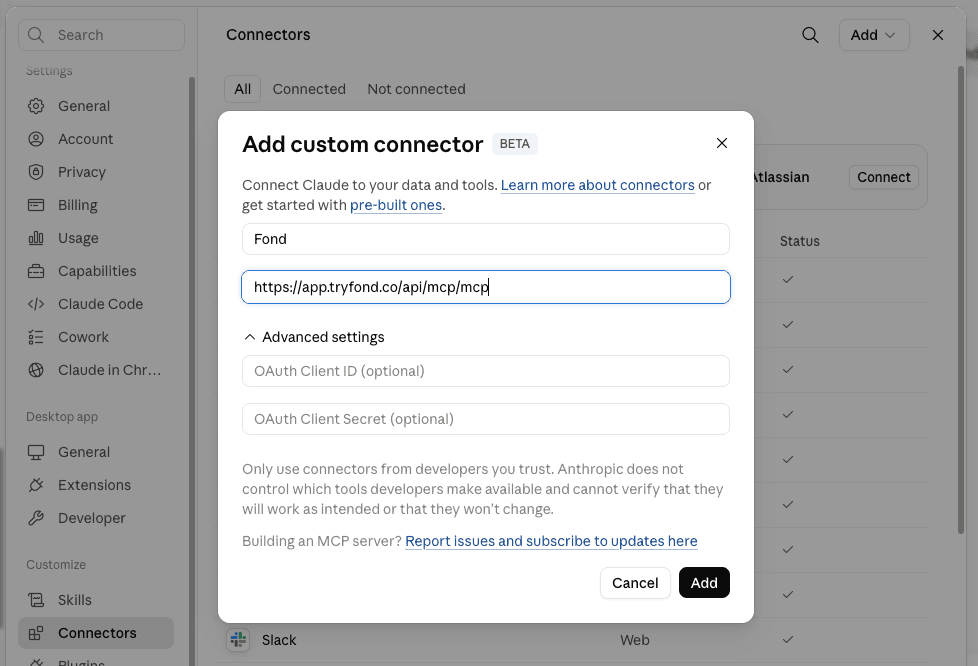
- In Claude, go to Settings → Connectors → Add custom connector.
- Enter these values:
- In Name, enter
Fond. - In MCP server URL, enter
https://app.tryfond.co/api/mcp/mcp. - Leave all fields under Advanced settings empty. Fond does not need the optional OAuth Client ID and OAuth Client Secret.
- In Name, enter
- Click Add.
- Click Connect.
- Log in to Fond to give read access.
If your version of Claude asks you to select an OAuth client, use the one marked Recommended. With it, Claude proves which application asks for your data. No client ID — register one automatically also works.
Before you approve, read the Check where this goes line on the Fond consent
screen. It names the site that receives your access: claude.ai from Claude, or
localhost with a port for a tool on your own computer. Anybody can name a
connector "Fond". If you do not recognize the destination, click Deny.
Fond shows that screen each time you connect or reconnect. It is the only place where you select, or later change, which of your organizations Claude can read.
You can now name Fond in any conversation. For example: "Using Fond, summarize my AI visibility for the last run."
Other MCP clients
The connector is a standard remote MCP server (Streamable HTTP + OAuth 2.1). Any
MCP client that supports remote servers with OAuth can connect to
https://app.tryfond.co/api/mcp/mcp:
-
In Claude Code, run the command below. Then call a Fond tool, and complete the login when Claude Code asks.
claude mcp add --transport http fond https://app.tryfond.co/api/mcp/mcp -
In other clients, enter the URL and complete the Fond login. The client finds the OAuth details by itself.
Clients that can use only local (stdio) servers, or cannot complete an OAuth login, cannot connect.
What you can ask
Claude first lists the brands that your account can access, then answers about the brand that you name:
| Ask about | What you get |
|---|---|
| Visibility | Counts from your latest run: answers, mentions, position in the answer, and sentiment. Also feed quality and a 30-day mention trend. |
| Share of voice | Your share of voice against competitors, by intent depth, and the "vacuum zones" that nobody owns. |
| Citation gaps | Cited domains grouped as yours, a competitor's, or neutral, which shows the sites answers cite in your place. |
| Cited pages | The pages AI answers linked in your latest run, most-cited first, with the queries each answered. Also the title and page type of each page Fond has read. Name a domain to get only its pages. |
| Competitor movement | How the competitive leaderboard changed from the previous run to the latest. |
| Recommended actions | Ranked AI-visibility gaps that you can fix, with the evidence for each. |
| Brand context | The brand profile Fond holds, who last wrote each field, and the log of research that already ran. |
| Citation report | Your latest Citation Analysis Report with its contact directory, or whether a report is in progress or failed. Claude can also start one, with that permission. |
| Search Console | Clicks, impressions, CTR and average position from your connected Google Search Console property, and Google's live index status for single URLs. |
| Keywords, rankings and backlinks | Keyword research and metrics, SERP results, domain overviews, ranked keywords, domain competitors, backlink profiles, your saved keywords, and your rank trackers. |
The last two rows appear only if Fond has enabled SEO for your account.
Tools that need a paid plan
Tools that buy new SEO data need a paid plan. These are keyword research and metrics, SERP results, domain overviews, ranked keywords, domain competitors and the paid backlinks tabs. Creating a tracker, adding keywords to one, or running one off-schedule also needs a paid plan. Removing tracker keywords is free.
On a free plan, a paid tool says that it needs a paid plan, and does not return an empty result. Your saved keywords, current tracker results and the backlinks overview are free on all plans.
Tools that write
The tools that save keywords or manage rank trackers appear only with the saved-keywords and rank-tracking permission. Without it, they are not listed.
Reading your citation report is always free. Claude can start a report only with that permission.
A report that Claude starts follows the rules of the Generate button on Fond's Citation Analysis page. The eligibility checks and the limit for each billing cycle are the same, and one report can be in progress at a time. It counts as yours and shows in your dashboard.
Unlike a report you start, a report that Claude starts counts against the allowance even if it fails. This stops Claude retrying a failing report without limit. Generation takes a few minutes, so Claude checks back later.
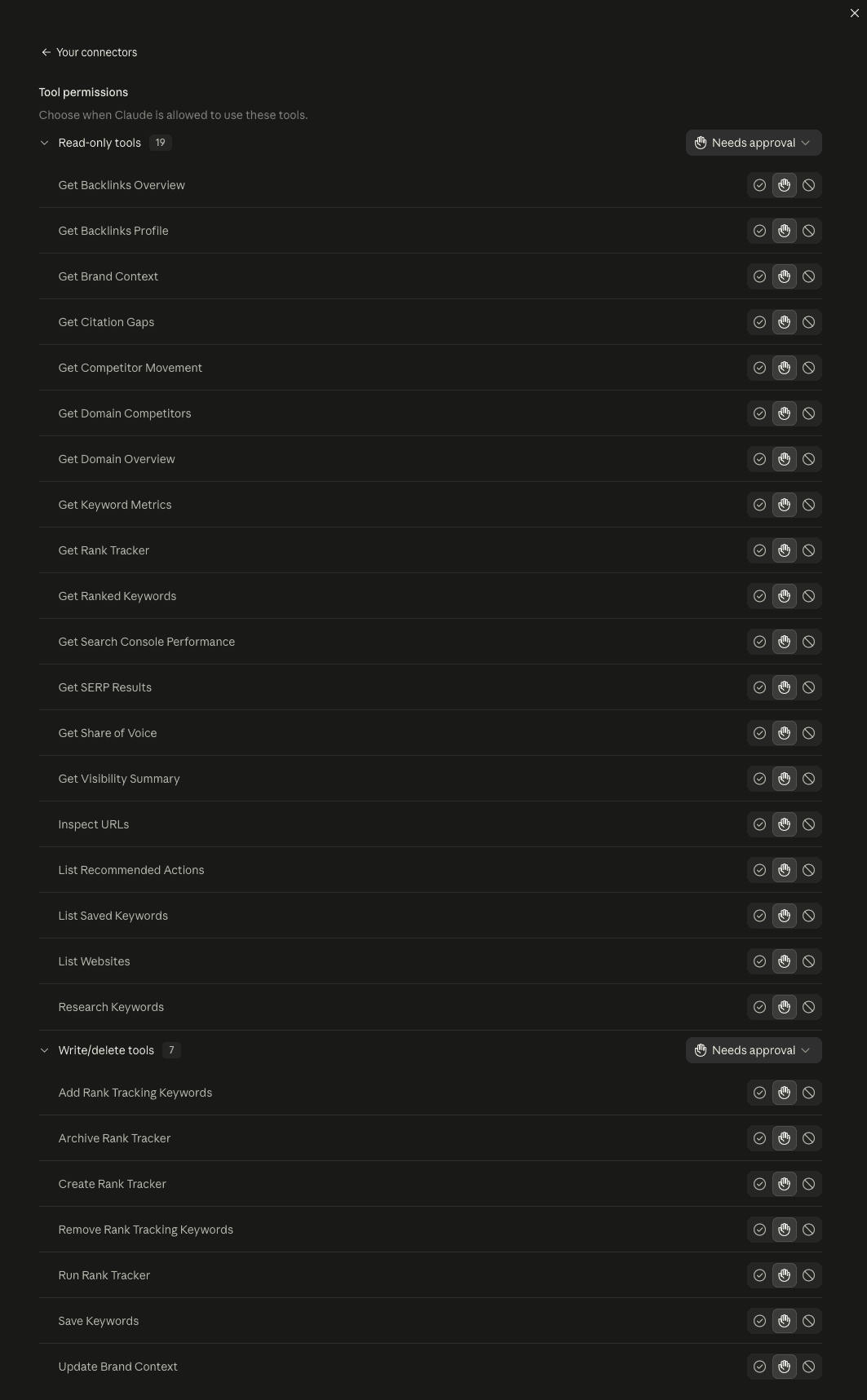
In Claude's settings, you can set how Claude can use each Fond tool:
Run stamps
Each answer about visibility, share of voice, citation gaps, cited pages, competitor movement or recommended actions carries a stamp of the run behind it. Fond measures those numbers from that run and never projects them.
Brand context, the citation report, and the search, keyword and ranking answers do not measure one run, so they have no run stamp. The citation report names each run in its window instead.
Troubleshooting
Access denied when connecting
Fond has not enabled the connector for your account. To check, open AI Connector in the dashboard, or contact support.
Connecting fails immediately
Check the MCP server URL one character at a time. It must be
https://app.tryfond.co/api/mcp/mcp, with /api/mcp/mcp at the end.
Then open Advanced settings and make sure that the OAuth Client ID and Client Secret boxes are empty. If you filled them in, clear them and connect again. Both OAuth client options work, so that setting is not the cause.
Claude asks you to sign in on every call
Disconnect and reconnect the connector in Claude's settings.
"Website not found or not accessible"
Your account cannot access this brand, or the brand's setup is not complete.
"No data yet"
The brand has not completed a query run. Data appears when the first run finishes.
Edge Measurement
Run a small Cloudflare Worker in front of your store so Fond counts AI visits at your own edge, including AI crawlers and visitors Google Analytics does not record. What it measures, what it cannot, and how to remove it.
Plans and limits
What each Fond plan allows: websites, tracked queries, runs, assistants and models, monthly actions, integrations and rank tracking.